
01. Summary & Overview
The Darkstar Homelab is a personal Linux server deployed in a local homelab environment to serve as a hands-on systems-engineering and infrastructure laboratory. It operates containerized services through Docker Compose, providing a practical, safe environment for learning how to organize, operate, monitor, and document self-hosted systems.
The primary objective of the Darkstar project is not to simulate a massive multi-node enterprise cluster, but rather to build rigorous operational habits: controlled changes, service separation, private access, internal DNS resolution, reverse proxy port routing, service observability, and clean Git-based workflows.
By treating local consumer hardware with the same discipline useful in research computing environments, this homelab builds concrete, transferable skills directly relevant to managing future research-computing workflows.
02. Problem & Motivation
Transitioning from theoretical system-administration concepts to practical infrastructure competency requires a laboratory environment where one can safely make changes, observe side effects, and troubleshoot service states.
A well-structured homelab solves several critical learning roadblocks:
- Controlled service experimentation: Allows hands-on practice with container namespaces, host directories, and local configurations.
- Network routing complexity: Replicates practical access-control patterns like private VPN mesh networks, local domain routing, and certificate management.
- Habitual observability: Provides real targets to monitor, turning minor service issues into visible log outputs and alerting indicators.
Scientific and research environments often require many of the same technological pillars: robust Linux kernels, secure and authenticated access boundaries, visible status logs, reproducible configurations, and meticulous documentation habits. Operating this local lab provides a repeatable method to study these structures directly.
03. System Architecture
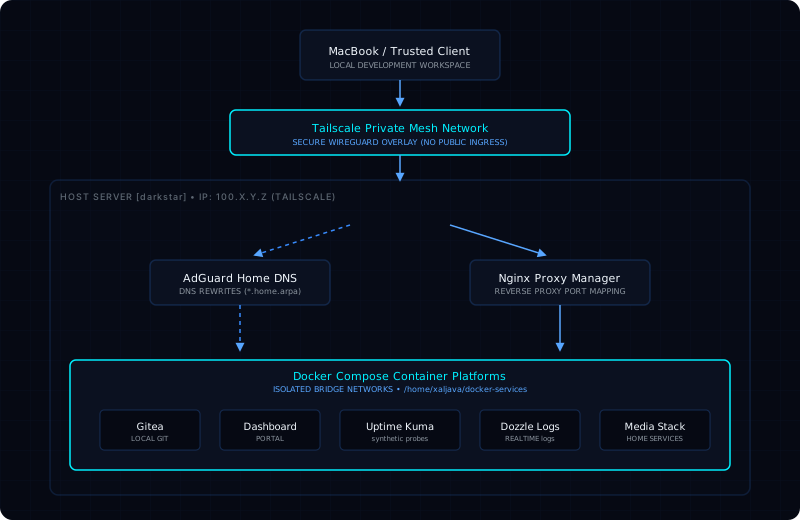
The lab is configured with an emphasis on local service separation and secure internal-only routing. No ports are forwarded from the local router, and local assets are accessed through secure private pathways.
The technical baseline is configured as follows:
- Hardware Host: Dedicated physical node running under the local hostname
darkstar. - Main Service Root: Structured under
/home/xaljava/docker-services/, with each service separated into its own dedicated subdirectory containing explicit compose configurations, environment parameters, and data volume binds. - Private Overlay Mesh: Tailscale private networking is used to connect remote dev clients securely, avoiding public ingress points.
- Internal DNS Resolver: AdGuard Home manages recursive local DNS resolution, providing clean service-friendly hostnames (mapped under the private
.home.arpazone). - Reverse Proxy Layer: Nginx Proxy Manager intercepts local host requests and forwards traffic directly to Docker Compose networks, managing internal mappings.
04. Network Topology
Below is the topological data flow representing secure access to local containerized services:
05. What I Built & Configured
The deployment currently hosts a suite of services integrated for secure development and light operations:
Docker Compose Architecture
Wrote clean, standardized compose configurations utilizing user-space directories, environment parameter files, container network groupings, volume mappings, and automatic log-rotation overrides.
Internal Hostname Mappings
Integrated AdGuard Home DNS rewrites with Nginx Proxy Manager to map internal host requests (e.g., gitea.home.arpa or uptime.home.arpa) to Docker networks, bypassing external routing.
Telemetry & Health Probes
Configured Uptime Kuma to verify internal service responsiveness continuously, and deployed Dozzle to provide localized browser-based container log streams for rapid troubleshooting.
Local Collaboration Hub
Established a Gitea server as a local Git repository for committing, tracking, and backup-packaging versioned infrastructure layouts, scripts, and document modifications.
06. Operational Best Practices
Operating a reliable, clean environment requires committing to structured operational habits to eliminate configuration drift:
Service Separation
Each Docker Compose stack occupies its own separated user-space folder under docker-services/. Environment variables, persistent binds, and configurations are committed locally.
Controlled Access Model
Access is locked strictly behind the Tailscale mesh overlay VPN. No external open ports exist on the local router, protecting the internal network and minimizing attack surface.
Scripted Workflows
Rather than editing configurations live in production, all website and infrastructure edits are checked locally, committed to Git, and synced to target folders using a structured, non-destructive deployment script.
Secret Separation
All database passwords, tokens, and credentials are swept out of the Git-committed configuration files and mapped strictly via localized, private .env references.
07. Key Engineering Takeaways
Core Systems Foundations Acquired
Through constructing and managing this laboratory, I have developed practical foundational competencies in:
- Linux Operations: systemd unit diagnostics, log analysis, resource tracking, process constraints, and persistent directory bindings.
- Service Port Routing: Designing custom reverse-proxy layers, managing internal HTTP redirects, and mapping private domain namespaces.
- Version Control Discipline: Enforcing atomic commit logs and tracking modifications via private repositories before staging deployment files.
08. Relevance to Scientific Infrastructure
It is important to state clearly: this homelab is not a scientific production system. It is, however, a disciplined learning environment designed to build the transferable infrastructure foundations relevant to managing research computing and data-intensive workflows.
Reproducible Deployments
Scientific computing environments often require that code, pipelines, and execution environments run with identical, reproducible results. Docker-compose design practices form a direct baseline for understanding containerized pipeline replication.
Infrastructure Observability
Physics collaborations process telemetry streams from extremely sensitive instruments. Operating and verifying local status checks, logging boundaries, and alerts aligns directly with ensuring high data-stream reliability.
Controlled Access Boundaries
Practicing private mesh networking and granular access boundary control prepares me for understanding secure user grids in research computing environments.
09. Practical Limitations
An honest operational review reveals key architectural limitations that represent active, ongoing opportunities for system improvements:
No High-Availability Failovers
The system is deployed on a single physical host. If the hardware suffers a component failure, service downtime is unavoidable.
Local Backup Gaps
Backups are compiled locally but lack redundant, offsite replication. If the physical site suffers an outage, data remains at risk.
HPC Study Stage
While research computing workload scheduling (SLURM, MPI, HTCondor) remains an active learning path, they are currently simulated and studied conceptually rather than deployed in the local homelab environment.
10. Strategic Next Improvements
To address current operational limitations, the learning path is configured with these specific engineering tasks:
Off-Site Backup Pipeline
Configure automated, encrypted backups of Gitea repos and Docker directories to an external offsite storage box using secure backup utilities.
Service Recovery Runbooks
Document precise, step-by-step service recovery runbooks to speed up disaster-recovery tasks during site hardware outages.
HPC Simulation Lab
Set up a dedicated local virtual cluster to begin executing basic SLURM job schedulers, MPI data transfers, and HTCondor job submissions.