
01. Summary & Overview
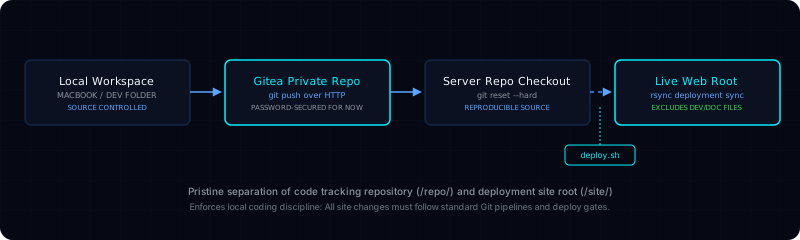
The Git-Based Website Deployment Workflow is a practical, local-first publishing pipeline designed to manage website modifications securely and systematically. Development happens locally on a MacBook, changes are tracked and committed with Git, pushed to a private Gitea repository on the darkstar host, and pulled to a separate server-side repository checkout before publishing.
The primary purpose is to completely avoid editing live production files on the web server. Instead, a server-side shell script (deploy.sh) executes required file-system checks, pulls the verified commit from Git, and copies only publishable static files into the live directory.
This workflow creates a simple, reliable, and rollback-friendly release process with a clear, absolute separation between the source code repository and the live, public-facing web root.
02. Problem & Motivation
Editing website files directly on a live production server is a highly risky and undisciplined administrative pattern. If a typo, malformed tag, or broken script is introduced during a live edit, visitors will experience instant breakage. Furthermore, live direct-edit workflows lack change histories, making rollbacks difficult and stressful.
While advanced AI-assisted CLI editing tools (such as Gemini CLI) are extremely useful for speeding up development, they operate best in local development directories rather than directly inside live production paths.
A safer, structured publishing pipeline was needed to enforce professional DevOps-style constraints:
- Local development first: All design, writing, and coding must occur inside a local workspace.
- Grounded change tracking: All modifications must be committed to local Git histories before publishing.
- Release-gate scripting: Live directories are updated only after a deployment script verifies repository states.
03. System Architecture
The architecture divides the deployment pipeline into three distinct operational boundaries: the Local Workspace, the Version Control Hub, and the Live Server Host. For current simplicity, password-based Git over HTTP is utilized for Gitea authentication, with plans to migrate to SSH keys or secure access tokens later.
The system directories and routes are mapped as follows:
- Local Workspace (MacBook):
/Users/js/projects/personal/darkstar-homepage - Gitea Private Repository:
http://gitea.darkstar.home.arpa/xaljava/darkstar-homepage.git - Server Service Directory:
/home/xaljava/docker-services/personal-site - Server Repository Checkout:
/home/xaljava/docker-services/personal-site/repo/darkstar-homepage - Live Public Web Root:
/home/xaljava/docker-services/personal-site/site - Deployment Shell Script:
/home/xaljava/docker-services/personal-site/deploy.sh
04. Deployment Flow Diagram
Below is the topological path representing the systematic flow of code changes from local development to the public Docker-served web root:
05. What I Built & Configured
To support this repeatable DevOps workflow, I established several local static configurations and automation points:
Local Git Commit Checks
Enforced atomic Git commit habits locally. Checked modifications on the MacBook workspace and verified directory statuses before pushing code, preventing incomplete files from entering version history.
Private Gitea Hosting
Configured a private Gitea repository on the server host to act as the primary, secure version-control hub. Manages project access and branches cleanly, maintaining a central tracking history.
Server-Side Git Integration
Deployed a non-bare server repository checkout. This directory pulls changes from Gitea and serves as an intermediate staging buffer where code integrity is verified before syncs.
Rsync-Based Deploy Script
Wrote a repeatable bash shell script (deploy.sh) to automatically pull latest Git changes, perform safety validations, and execute incremental rsync syncs excluding dev-only files.
06. Deploy Script Behavior
The deploy.sh script acts as a rigorous gatekeeper protecting the live web root. Below is a summarized look at the exact operational sequence executed by the script:
#!/bin/bash
# deploy.sh - Static portfolio deployment script
set -e # Terminate immediately on any error

REPO_DIR="/home/xaljava/docker-services/personal-site/repo/darkstar-homepage"
SITE_DIR="/home/xaljava/docker-services/personal-site/site"

echo "=== Starting deployment workflow ==="
cd "$REPO_DIR"

# Step 1: Verify repository status
if [ ! -d ".git" ]; then
    echo "ERROR: Target directory is not a Git repository." >&2; exit 1
fi

# Step 2: Sync and pull latest changes cleanly
git fetch origin
git reset --hard origin/main

# Step 3: Core files validation checks
if [ ! -f "index.html" ] || [ ! -f "styles.css" ] || [ ! -f "script.js" ]; then
    echo "ERROR: Required web assets missing. Deployment aborted." >&2; exit 1
fi

# Step 4: Publish to live root excluding dev files
echo "Syncing verified changes to public root..."
rsync -av --delete \
    --exclude=".git/" \
    --exclude="README.md" \
    --exclude="devplan.md" \
    --exclude="reference/" \
    "$REPO_DIR/" "$SITE_DIR/"

echo "=== Deployment successful: Site is live ==="
07. Operational Best Practices
The deployment architecture relies on strict habits to keep operations predictable and repeatable:
Pristine Folder Separation
The Git source code folders (which include development references, logs, and markdown devplans) are kept completely separate from the live web directory, keeping the public web root clean.
No Direct Live Edits
Live files in the web root are never edited manually. Any change—even a single punctuation correction—must be committed, pushed to Gitea, and compiled via the deploy script.
Fail-Safe Gatekeeping
The deploy script terminates immediately (set -e) if a network pull, file-validation check, or synchronization fails, guaranteeing that no partial or corrupted site changes are published.
Clean Version-Control
All development steps are organized into atomic, conventional commits on local branches. This creates a clean history where rollbacks to stable versions are always possible.
08. Key Engineering Takeaways
DevOps SRE Foundations Developed
Through developing and testing this local pipeline, I have acquired practical foundational competencies in:
- Separation of Concerns: Decoupling source code archives from live, deployed public-facing artifacts.
- Automated Release Safety: Implementing strict file validation and pre-checks in shell scripts to catch errors early.
- Web Ingress Isolation: Deploying local sites securely within Docker environments, ensuring no local assets are directly exposed to public interfaces.
09. Relevance to Scientific Infrastructure
It is important to state clearly: this workflow is a small-scale static site pipeline, not an enterprise cluster CI/CD. However, the core engineering patterns developed are directly relevant to the operational requirements of next-generation astrophysics and research computing environments.
Controlled & Auditable Changes
Astrophysics collaborations (such as Cosmic Explorer, LIGO, and the Einstein Telescope) process telemetry using highly complex, auditable pipelines. Enforcing versioned Git controls and strict shell-script gates mirrors the exact change-control protocols used to protect scientific computing codes.
Reproducible Deployments
In high-performance computing (HPC) centers and research grids (like IGWN and GWOSC), software configurations must be completely reproducible to prevent data drift. Separating source files from live run-roots is fundamental to deploying reliable grid nodes.
Controlled Pipeline Safety
Scientific workflows handle immense, high-throughput operations. Setting up local scripts that verify file structures before executing copy syncs prepares me for understanding complex data ingest paths and job submission gates in HPC environments.
10. Practical Limitations
An honest evaluation of this static workflow reveals several key operational limitations that represent active, ongoing opportunities for system improvements:
Manual Script Invocation
While the sync is scripted, the deployment must still be triggered manually by logging into the server and executing the script via terminal shell commands.
Git over HTTP Simplicity
Using password-based Git over HTTP is simple for a local lab setup, but does not implement stronger security patterns like SSH keys or deploy tokens.
No Staging Environment
Changes go directly from development to the live web directory, with no intermediate staging or preview folders to inspect layouts before publishing.
11. Strategic Next Improvements
To address current operational limitations, the learning path is configured with these specific engineering tasks:
SSH & Deploy Tokens
Switch Gitea access credentials from simple HTTP password login to secure SSH keys or read-only Gitea access tokens.
Webhook Automation
Integrate a Gitea webhook to automatically trigger the deploy.sh script upon code merge to the main branch, eliminating manual steps.
Staging Preview Folder
Create a parallel staging directory (e.g., staging.home.arpa) to preview and visually QA layouts before syncing to the live web folder.