
01. Summary & Overview
The Scientific Computing Practice Lab is a planned, next-stage learning environment. Its primary purpose is to extend the existing Darkstar homelab from general single-host Linux and Docker operations toward practical, foundational research-computing concepts: job scheduling, reproducible software environments, scientific data workflows, and small virtual lab patterns.
This document serves as an honest, future-oriented roadmap outlining the design architecture, learning objectives, implementation phases, and intentional limits of the practice lab before implementation begins.
By laying out this technical blueprint, the project defines a systematic, self-directed training path to bridge the gap between general DevOps skills and the specialized operational support useful in research computing environments.
02. Problem & Motivation
Supporting scientific research groups, astrophysics collaborations, and research computing groups requires more than general Linux systems administration. Systems engineers in these fields must understand how researchers execute workloads, structure their pipelines, interact with scheduling queues, manage large-scale storage, and guarantee reproducible research environments.
A well-designed local practice environment solves several key training challenges:
- No Public HPC Sandbox: Access to real supercomputers is restricted strictly to active scientific researchers. A local lab provides a low-risk playground to study scheduler configurations.
- Safe Scheduler Exploration: Permits safe experimentation with job constraints, node configurations, queue priority partitions, and workload logging.
- Reproducible Workflow Practice: Provides a baseline to study data-pipeline structures, input/output paths, and dependencies in a controlled environment.
This roadmap establishes a credible method to learn these skills hands-on, without overclaiming past production experience.
03. Planned Architecture
The planned practice lab will run as a small virtual lab hosted on available local hardware or isolated virtual machines. The design separates roles to replicate standard cluster computing environments:
- Staging / Login Node: Acts as the primary entrance node where sample batch jobs are checked, scripts are edited, and tasks are submitted to the queue.
- Control / Scheduler Concept Practice: Runs SLURM or a lightweight queue simulator to manage job workloads, priority partitions, and worker node allocations.
- Compute-Style Practice Node(s): Isolated virtual instances dedicated strictly to processing queued tasks, processing calculations, and outputting job files.
- Shared Storage Mount: A local shared directory simulating cluster storage (e.g. NFS or shared volume) where datasets, scripts, and logs reside.
- Observability Dashboard: Integrated with existing homelab tools to monitor CPU, memory, log files, and service states across all nodes.
04. Planned Lab Topology
Below is the topological blueprint designed for the local research-computing practice lab:
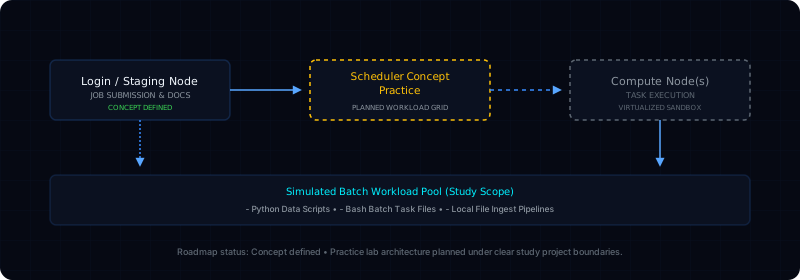
05. Primary Learning Objectives
The planned lab syllabus is designed to acquire repeatable, hands-on infrastructure capabilities:
Virtual Node VM Operations
Learn to configure, link, and network multiple isolated virtual environments or containers under localized host routing, simulating basic node interaction.
Scheduler Concepts
Practice SLURM terminology (node, partition, job queue) and understand the full lifecycle of submitted tasks from login staging to computing nodes.
Reproducible Software
Construct reproducible runtime environments utilizing explicit system tools and dependencies, preventing software version conflicts across nodes.
Workload Observability
Integrate logging and resource metrics tracking across multi-node tasks to audit compute consumption and analyze task bottleneck errors.
06. Implementation Roadmap
To structure study efforts systematically, the implementation path is mapped across five distinct phases:
Phase 1: Lab Foundation
Establish virtual machine hosts, configure multi-node local networking, map hostnames cleanly, and design a shared practice directory for data transfers.
Phase 2: Scheduler Setup
Install and configure SLURM or a lightweight queue simulator. Group virtual nodes into partitions and execute basic queue status commands.
Phase 3: Workload Design
Write sample Python datasets scripts and Bash batch tasks. Define reproducible run parameters, input/output paths, and logs tracking files.
Phase 4: Multi-Node Telemetry
Integrate centralized logging across all compute nodes. Collect process performance stats and analyze node stress limits under task execution.
Phase 5: Portfolio Output
Document key lessons learned, capture terminal screenshots, publish an architecture case study update, and connect skills to scientific support roles.
07. What This Lab Will Not Be
To maintain clear project boundaries and avoid overclaiming, we define strict boundaries for this training project:
Not a Production Cluster
This is a localized multi-node virtual simulator deployed on personal consumer hardware, not a production HPC center.
No Scientific Affiliations
This lab is a private study project and carries no official or direct affiliation with LIGO, Cosmic Explorer, IGWN, or any supercomputing center.
No Real Scientific Data
The lab is designed to process small, mock datasets for pipeline study, not real scientific collaboration data from scientific instruments.
08. Relevance to Scientific Infrastructure
While configured at a smaller, virtualized scale, the transferable infrastructure foundations practiced in this lab map directly to scientific infrastructure target environments:
Understanding Task Schedulers
Research computing groups and research networks (like IGWN and GWOSC) rely on complex workload queues. Practicing job submissions, queue diagnostics, and file outputs prepares me directly for supporting these environments.
Reproducible Research
Astrophysical collaborations (such as Cosmic Explorer, LIGO, and the Einstein Telescope) process telemetry across multiple remote nodes. Learning to ensure reproducible environments is key to pipeline stability.
Operational Support Awareness
Managing research infrastructure involves assisting users, troubleshooting job outputs, and organizing data storage. The lab is structured to build the technical language useful for collaborating with scientific users.
09. Current Project Status
Stage: Early Conceptual Planning
The lab is currently at the concept definition stage. The existing Darkstar homelab provides the base systems-operations environment. The next action is to design the virtual node topology, select the vm/container framework, and choose the scheduler practice approach.
10. Immediate Next Actions
To kick off the implementation, the initial tasks are planned as follows:
1. Choose VM Framework
Select a local virtualization platform (e.g. VirtualBox, Proxmox, or Docker containers) to simulate separated nodes on available local hardware.
2. Initialize Git Repository
Create a dedicated local Gitea workspace repository to store planned topology documentation, node configurations, and sample batch files.
3. Setup Basic Scheduler
Install and test a basic, lightweight local scheduling workflow to verify multi-node queue communication and job logs generation.