
01. Summary & Overview
This case study documents the private-access model configured for the Darkstar Homelab. Instead of exposing internal development services directly to the public internet, access is routed through a private mesh VPN overlay.
The setup integrates AdGuard Home to provide recursive local DNS rewrites (mapped under the private .home.arpa namespace), while Nginx Proxy Manager serves as a centralized reverse proxy routing clean, port-free internal hostnames to corresponding Docker containers.
The result is a consistent access pattern for a personal systems-engineering lab: services are easy to reach from trusted devices, naming is unified, and public network exposure is minimized.
02. Problem & Motivation
As a Docker-based homelab grows, managing access to containerized services quickly becomes unmaintainable when relying on raw IP addresses and miscellaneous port numbers (e.g., 192.168.1.100:3000, 192.168.1.100:8080). It leads to cognitive fatigue, bad documentation habits, and fragmented configurations.
Furthermore, exposing these administrative dashboards publicly through router port-forwarding just for convenience is a less secure administrative pattern, opening local hosts to automated port scans and unauthorized access attempts.
The primary objective was to design a clean, local-first access routing system that:
- Works from trusted client devices (MacBook, phone) regardless of physical location.
- Implements clean host naming utilizing the official, non-resolving
.home.arpanaming standard. - Avoids direct public exposure by eliminating router port-forwarding entirely.
- Centralizes HTTP/HTTPS traffic behind a unified local reverse proxy.
03. System Architecture
The architecture relies on four main pillars to construct a reliable and deterministic service path:
- Tailscale private network overlay: Trusted devices join a private WireGuard-based mesh network. The server is reached via its secure, static Tailscale IP address (e.g.,
100.x.y.z). - AdGuard Home DNS rewrites: Manages recursive local DNS. Any request under the private domain zone (such as
*.home.arpa) is rewritten directly to the server's local address. - Nginx Proxy Manager reverse proxy: Intercepts local HTTP traffic on standard ports
80/443. It matches the incoming host request and proxy-passes connections to Docker Compose networks. - Isolated Docker networks: Containers remain situated behind the proxy and cannot be reached directly from outside the server host, creating a practical service boundary.
This architecture enables clean, port-free host access examples, such as:
gitea.home.arpa, uptime.home.arpa, homepage.home.arpa, and dozzle.home.arpa.
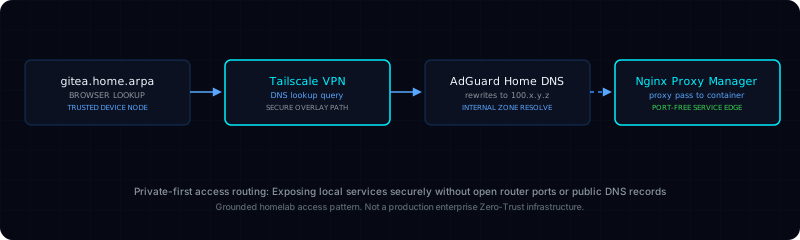
04. Access Flow Diagram
Below is the topological routing path representing how a browser request for an internal service resolves and proxy-routes securely:
05. What I Built & Configured
I established a cohesive, local-first access model using these private networking blocks:
Tailscale VPN Overlay
Enrolled the server and trusted remote workstations into a private mesh network. Connects nodes directly with end-to-end WireGuard, eliminating external public router ports.
Recursive AdGuard DNS
Configured AdGuard Home to serve as a private recursive resolver, adding wildcard DNS rewrites mapping all local domain traffic (*.home.arpa) to the server's private address.
Nginx Proxy Edge Routing
Deployed Nginx Proxy Manager to intercept incoming traffic on local ports 80/443. Manages port-mapping behind clean, readable, port-free URLs with strict reverse-proxy rules.
Service Names Documentation
Compiled meticulous, repeatable internal documentation detailing every local hostname, Docker bridge subnet route, host port binding, and proxy destination path for the lab.
06. Operational Best Practices
Operating a reliable, clean network layout requires adhering to practical networking habits:
Private-First Principle
Always avoid public ingress points. Deployed service consoles are kept private behind the VPN overlay unless there is an absolute and explicit reason for public-facing access.
Clean Hostnames
Never connect to local services using raw IP:port parameters. Enforced a discipline where all active containers must be accessed via consistent, readable .home.arpa domains.
Separation of Roles
Maintained a clean separation of roles: AdGuard Home manages DNS resolution, Nginx Proxy Manager handles reverse proxy routing, and Docker Compose governs container networks.
Credential Protection
Never include passwords, API tokens, local subnets, or sensitive WireGuard keys in website files, documentation repositories, or public-facing visual screenshots.
07. Key Engineering Takeaways
System Networking Foundations Studied
Through developing and testing this private-access layout, I have developed practical foundational competencies in:
- DNS Resolution vs Port Proxying: Understanding the clear operational difference between mapping name lookup tables and proxy-forwarding HTTP sockets.
- Mesh VPN Overlay Topologies: Implementing virtual, secure software-defined network layers that bypass consumer NAT limitations.
- Service Discovery Maintainability: Enforcing consistent domain schemas to keep local services readable, documented, and easily searchable.
08. Relevance to Scientific Infrastructure
It is important to state clearly: this private access model is a personal lab setup, not a formal enterprise security architecture. However, the fundamental concepts implemented are relevant to Linux infrastructure and research computing environments:
Controlled Research Access
Physics collaborations (such as Cosmic Explorer, LIGO, and the Einstein Telescope) often utilize private internal networking patterns. Practicing mesh VPN client overlays directly mirrors the access-control concepts used to reach internal dashboards and operational services.
Telemetry Service Gateways
In research computing environments and research networks (like IGWN and GWOSC), internal dashboards (for monitoring, job status, and logs) are gated behind secure gateways. Designing proxy routes to Gitea and Uptime Kuma builds direct conceptual preparation for understanding these environments.
Minimizing Public Footprints
Scientific workflows handle immense data transfers across research environments. Adhering to a zero public port-forwarding footprint is fundamental to understanding how to reduce unnecessary public exposure.
09. Practical Limitations
An honest evaluation of this network layout reveals key operational limitations that represent active, ongoing opportunities for system improvements:
Not a Zero-Trust Architecture
The system relies on trusted device membership in the VPN. It is a useful homelab access pattern, but does not implement fine-grained, identity-based Zero-Trust Application access.
TLS Certificate Gaps
While HTTP proxy routing is active, internal services currently utilize self-signed or unencrypted HTTP connections within the private VPN tunnel, which needs TLS optimization.
Lack of Active Access Alerting
The mesh networking connection states are monitored conceptually, but no active alerts are configured to flag unauthorized local routing attempts or DNS packet drops.
10. Strategic Next Improvements
To address current operational limitations, the learning path includes these specific tasks:
Local CA & TLS Certificates
Configure a private Let's Encrypt Wildcard certificate lifecycle using DNS-01 challenges or set up a local Certificate Authority (CA) to enforce HTTPS for all internal service names.
Availability Health Probes
Integrate automated synthetic availability probes in Uptime Kuma to verify Nginx Proxy Manager route responsiveness and alert on DNS packet drops.
Comprehensive Access Maps
Develop detailed, step-by-step graphical access maps for each major running container to speed up system troubleshooting during service modifications.